
As my five or six regular readers know, my husband and I are a small plaintiffs’ civil rights firm. From our founding in 1996, we have leveraged technology to be able to take on much bigger firms representing enormous companies. In 1996, this meant spending most of our monthly budget on a Westlaw subscription and investing in the discovery management program used by the biglaw firm where we met. In my personal experience, it also helps to marry a database nerd, as Tim adopted — and then taught me to use — Microsoft Access early on, and databases have been a crucial tool in all of our large cases.
Here are five applications that I love and use regularly and that continue to be essential to our success as a small firm: Airtable; CaseFleet; aBreevy8; Workflowy; and Bulk Rename Utility.
Airtable
Airtable is a basic relational database platform that I use for a very wide variety of purposes, from tracking billable time (linking people to cases to rates) to listing the book series I’ve read and want to read (linking books to authors to series). Airtable is not as powerful as MS Access, but Access is not shareable and Airtable is both shareable — it exists entirely online — and much easier to learn and efficient to use. Although the platform promotes many other uses — for example, project and inventory management — I use it to organize data into related tables, and then quickly and easily sort, filter, and query the data. For example, in most of our prison cases, I’ll set up a “people” table with the incarcerated individuals we’re working with, and an “events” table that tracks key events in the case, linked to the relevant people. It’s easy to add ad hoc tables, for example, in a current case, we served over 600 requests for admission which later turned into undisputed facts in support of summary judgment. I have tables linking people to events to RFAs to undisputed facts, which was incredibly useful in drafting our summary judgment motion. Indeed, Airtable and our wonderful paralegal can be credited for this shout-out in the Court’s decision granting partial summary judgment to our clients, Disability Rights Tennessee and several Deaf individuals in custody of the Tennessee Department of Correction:
[P]laintiffs’ voluminous spreadsheet of incidents . . . confirm that what is at issue in this case, at least as far as interpreters are concerned, is not isolated incidents, but a pervasive and continuing approach to when ASL-reliant deaf inmates will or will not be granted access to interpreters.
Trivette v. Tennessee Dep’t of Correction, No. 3:20-CV-00276, 2024 WL 3366335, at *18 (M.D. Tenn. July 9, 2024).
It’s also easy to set up different “views” of the data, so once you’ve filtered or sorted in specific ways, you can save that view, go back to seeing the entire table, and not have to redo the filter each time you want to see it. This also prevents the shout from across the small office, “hey! who filtered the database?!”
Since I can’t share any firm-related views, here is a snip from my Book Series Airtable:

Cool, no? Giant nerd, no?
CaseFleet
CaseFleet is an online discovery management platform that we use in all of our cases. During an enormous case several years ago, Tim researched a number of programs and found that CaseFleet was one of the only ones that permitted coding at the individual page level. Most discovery programs let you set up issue codes which you can then attach to each document. This is deeply unhelpful if, just to take a totally random example, you litigate against prison systems that continue to maintain paper-only files and, as a result, produce in discovery 500-page scanned pdfs consisting of the entire file for one prisoner. As you can imagine, if you coded at the document level, you’d likely attach most of your issues codes to each document and have no way of knowing where in the 500 pages the relevant text was. CaseFleet allows you to issue-code at the page level — or even sentence or word level — selecting a passage of text and coding for date, issue, importance, etc. It has a powerful Boolean search feature and efficient document viewing and coding windows.
The other wonderful thing about CaseFleet is that it’s a small operation and we’ve gotten to know their sales and training staff. If you decide to sign up, say hey to Jeff, Meg, and Charlotte from me!
aBreevy8 (formerly Breevy)
aBreevy8 is a universal text expander. You can create short text abbreviations and it will expand them on any platform and in any program. It is similar to Word’s “AutoCorrect” only much simpler and more powerful. I use it for simple replacements like “fs” becoming “F. Supp.” to entire phrases and sentences, for example, I have set up “ratub” to expand to “readily accessible to and useable by,” the standard for new construction under the Americans with Disabilities Act. It capitalizes the common abbreviations I use day to day: ADA, ASL, HUD, DOJ — and using a different short text thread, will produce the expanded version: Americans with Disabilities Act; American Sign Language; etc. It also supports italics, bold, and underlined text, so in typing cites, “id.” now automatically converts to id.
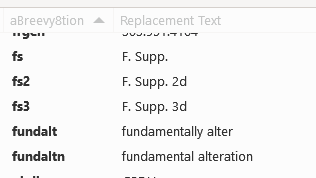
Replacements I set up in aBreevy8 work in any environment on my laptop: Microsoft programs; browser windows; Zoom chat windows; WordPerfect (yeah, yeah, yeah).
Pause to note that Firefox does not recognize WordPerfect as a thing. Sigh. We few, we happy few.

Workflowy
Workflowy is an incredibly useful outlining program. It would be a must if for no other reason than the fact that Word’s outlining feature is so far beyond awful — not only failing to generate useable outlines, but actively obstructing your work by randomly generating new levels, letters, numbers, indents, outdents, emojis, and small woodland creatures every time you hit the return key.
Even without the stark contrast to Word’s outlining dumpster fire, Workflowy would be an essential. You can easily expand, collapse, focus in, and move nodes at any level. It’s the way I organize every legal research or writing project I do now. And, like Airtable, it advertises a wide variety of other uses, so explore!
Bulk Rename Utility
Bulk Rename Utility permits you to rename groups of files quickly based on a number of parameters. Unhappy that your opposing counsel just produced 1,000 documents with no “-” between the Bates prefix and the number, when you’ve been using -‘s throughout the case? No problem! Bulk rename will let you insert a “-” into all 1,000 file names in one go. You can add prefixes, suffixes, and sequential numbers and delete the entire beginning or end of a file name. This has saved many frustrating hours of (let’s face it) my paralegal’s time renaming documents one by one.
* * *
So there you have my five favorite utility programs. Only sorry that “small firm semi-tech-competent software influencer” isn’t a thing.
 Thought Snax